On this projects page you can find various projects I have done involving electronics such as amplifiers, Raspberry Pi’s, and microcontrollers.
Temperature and Humidity Sensor
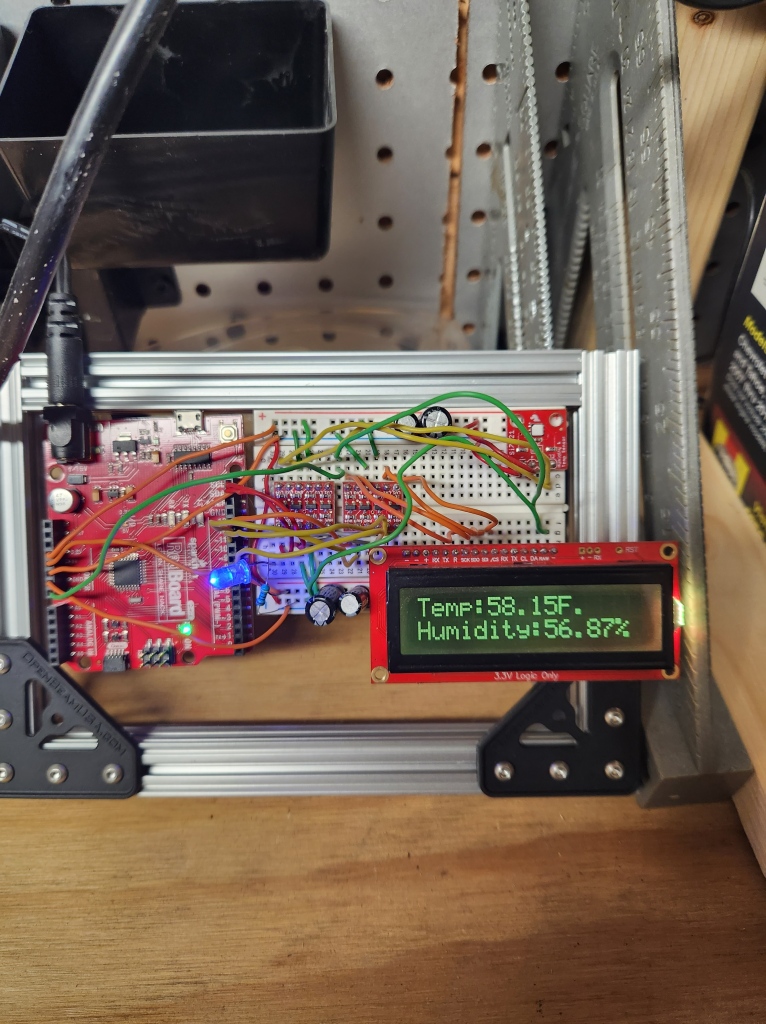
This temperature sensor project was something I decided to throw together after going through a bin full of spare electronics parts one night. I have collected a lot of miscellaneous sensors, MCUs, and development boards over the years that are all unfortunately collecting dust. This project gave me a reason put some of those boards to good use.
This project uses the following components:
- Sparkfun Redboard Qwiic
- Sparkfun Humidity and Temperature Sensor Breakout Si7021
- Sparkfun 16×2 SerLCD – RGB on black 3.3V
- Sparkfun Logic Level Converter
- 9V, 650mA (Barrel jack) – Wall Adapter Power Supply

I did not create a schematic/wiring diagram for this while putting it together. However, the level converters are needed to interface the 5V MCU board with the 3.3V LCD and sensor. The connections from the LCD and sensor to the MCU board needed were referenced from the Sparkfun website. I believe the LCD used a SPI connection and the sensor needed an I2C interface. The below code was used for reading sensor data and displaying it to the LCD. This was also heavily referenced from examples on Sparkfun.
// 05/10/2022
// Dan Sellers
// Arduino code to read in temp/humidity sensor and display on LCD

#include "SparkFun_Si7021_Breakout_Library.h"
#include <Wire.h>
#include <SPI.h>

float humidity = 0;      // variable for humidity value
float tempf = 0;         // variable for temp value
int csPin = 8;           // chip select pin for LCD
int counter = 0;         // counter variable
Weather sensor;          // create instance of ssensor

//--------------------------------------------------------
void setup() {
  Serial.begin(9600);        // open serial port over USB
  sensor.begin();            // initialize I2C for sensor
  pinMode(csPin, OUTPUT);    // set chip select as output
  digitalWrite(csPin, HIGH); // make sure chip select is not low
  SPI.begin();               //Start SPI communication
  SPI.setClockDivider(SPI_CLOCK_DIV128); //Slow down the master a bit
  digitalWrite(csPin, LOW);  //Drive the CS pin low to select OpenLCD
  SPI.transfer('|');         // put LCD in setting mode
  SPI.transfer(128 + 29);    // set red brightness (0 - 29)
  SPI.transfer('|');         // put LCD in setting mode
  SPI.transfer(158 + 29);    // set green brightness (0- 29)
  SPI.transfer('|');         // put LCD in setting mode
  SPI.transfer(188 + 0);     // set blue brightness (0 - 29)
  digitalWrite(csPin, HIGH); //Release the CS pin to de-select OpenLCD

}// end setup loop
//--------------------------------------------------------
void loop() {
  //Send the clear display command to the display - this forces the cursor to return to the beginning of the display
  digitalWrite(csPin, LOW); //Drive the CS pin low to select OpenLCD
  SPI.transfer('|'); //Put LCD into setting mode
  SPI.transfer('-'); //Send clear display command
  digitalWrite(csPin, HIGH); //Release the CS pin to de-select OpenLCD

  getWeather();
  /*
  char tempString[50]; //Needs to be large enough to hold the entire string with up to 5 digits
  sprintf(tempString, "Temp: %f F  Humidity: %f %",tempf,humidity);
  spiSendString(tempString);
  */
  char tempString[] = "Temp:";
  char tempEndString[] = "F.    ";
  char tempArray[10];
  dtostrf(tempf,5,2,tempArray);    // this function converts floating point to string
  delay(10);
  spiSendString(tempString);
  delay(10);
  spiSendString(tempArray);
  delay(10);
  spiSendString(tempEndString);
  char humString[] = "Humidity:";
  char humEndString[] = "%";
  char humArray[10];
  dtostrf(humidity,5,2,humArray);
  delay(10);
  spiSendString(humString);
  delay(10);
  spiSendString(humArray);
  delay(10);
  spiSendString(humEndString);
  delay(500);
  printInfo();
  counter = counter + 1;
  if (counter == 20){
    digitalWrite(csPin, LOW); //Drive the CS pin low to select OpenLCD
    SPI.transfer('|'); //Put LCD into setting mode
    SPI.transfer('-'); //Send clear display command
    digitalWrite(csPin, HIGH); //Release the CS pin to de-select OpenLCD
    char danString[] = "Dan Rules !";
    spiSendString(danString);
    counter = 0;
    delay(500);
  }// end if statement

}// end main loop

void getWeather()
{
  humidity = sensor.getRH();
  tempf = sensor.getTempF();

}// end getWeather function

void spiSendString(char* data)
{
  digitalWrite(csPin, LOW); //Drive the CS pin low to select OpenLCD
  for(byte x = 0 ; data[x] != '\0' ; x++) //Send chars until we hit the end of the string
    SPI.transfer(data[x]);
  digitalWrite(csPin, HIGH); //Release the CS pin to de-select OpenLCD
}// end the write to LCD function

void printInfo()
{
//This function prints the weather data out to the default Serial Port

  Serial.print("Temp:");
  Serial.print(tempf);
  Serial.print("F, ");

  Serial.print("Humidity:");
  Serial.print(humidity);
  Serial.println("%");
}//end serial print function
Overall the sensor and display work well. There was some sort of refresh issue that exists within the code. Maybe in the future I will come back to revisit this. For a little better looking end result I stuck the breadboard and MCU onto a small acrylic piece of material outlined with aluminum extrusion.
 SellersCircuits